Recovery: loader USB mode and restoring firmware
Status: draft, 2026-11
An AP30 whose firmware does not boot can be recovered from a computer, without opening it. The boot loader lives in a part of the flash that updates never write, and it has a USB mode ("loader USB mode", a Rockusb device 2207:262d) that can read and write the firmware slots. You get into it by holding D-pad Right + Power with the USB cable connected; a hardware reset fires after about 8 s of holding Power, and the loader then sees D-pad Right and stays in USB mode. From there a Rockusb client writes a known-good image back into slot FW1. This whole path was tested on a device with a deliberately broken firmware (see Evidence).
Contents
- Before you start
- Enter loader USB mode with the buttons
- The ~8 s Power long-press reset
- Enter loader USB mode from the running firmware (software)
- Talk to the loader
- Restore FW1
- Leave loader USB mode
- Troubleshooting
- Evidence: the hang-and-recover test
- If even this fails
- Open questions
- Sources
Before you start
You need:
- a computer with a direct USB 2.0/3.x port (Linux used here; rkdeveloptool also runs on macOS; RKDevTool on Windows is untested on the AP30),
- a Rockusb client that supports read LBA (0x14), write LBA (0x15), per-command timeouts and read-back (rkdeveloptool can list and query the loader; for reads and writes a client with timeouts is safer, see Troubleshooting),
- a known-good image: either your own backup of FW1 (backup.md) or an official update file (
HIFIYFnn.IMG, whose first 0x1C00000 bytes are exactly what the updater puts into a slot), - a charged battery.
Warning
- This procedure writes to the flash. Write only to loader LBA 0 (FW1) or loader LBA 0xF000 (FW2).
- Never write physical sectors 0..0x1FFF (the IDB area; ordinary LBA commands cannot reach it, do not use tools that can). Never run
rkdeveloptool ef. Neverdb/ula loader.- Keep the cable connected for the whole procedure. If a write fails, do not reset or unplug: the loader is still running and the same write can simply be repeated.
- Recovery path if anything below goes wrong: this page itself. The loader is never touched by these steps, so loader USB mode stays available.
Enter loader USB mode with the buttons
Works from any state: player running, hung, black screen, or switched off [AP30, device-proven].
- Connect the USB cable to the computer. (USB power is required: the loader only stays in USB mode while it sees VBUS.)
- Press and hold D-pad Right.
- While still holding D-pad Right, press and hold Power.
- After about 8 s the player resets (on Linux,
dmesgshowsUSB disconnect). Release Power now, but keep holding D-pad Right. - The host first sees a ~2 s full-speed device that fails to enumerate (
-71/-110errors). Ignore it: it appears on every boot with USB power and is not loader mode. - Then a high-speed device
2207:262dappears (Linux:new high-speed USB device … idVendor=2207, idProduct=262d). Release D-pad Right. The screen stays black. - Check:
rkdeveloptool ldlistsVid=0x2207,Pid=0x262d … Loader, or a Rockusb TEST_UNIT_READY returns status 0.
Why it works: the loader samples the key ladder about 500 times before booting; if the 0 V slot (D-pad Right) stays pressed and VBUS is present, it enters USB mode instead of booting [AP30, loader code]. Releasing D-pad Right together with Power can make the check fail and boot the (possibly broken) firmware again; just repeat [AP30, device]. Holding Power longer than needed triggers another reset ~8 s later, so let go of Power after the first one [AP30, device].
The loader stays in USB mode across unplug/re-plug of the cable: it re-enumerates as 2207:262d straight away [AP30].
The ~8 s Power long-press reset
| Fact | Tag |
|---|---|
| Holding Power alone resets the player after ~8 s (countdown timer measurement; earlier stopwatch estimates of ~10 s were too long) | [AP30, measured] |
| It repeats for as long as Power stays held (~10.5 s apart in host logs = 8 s hold + power-down/up time) | [AP30, measured] |
| It works the same with the loader running, with the stock firmware running, and with a hung firmware: it is hardware, independent of software | [AP30, measured] |
It is a power-on-class reset: it clears the loader's boot marker in PMU_SYS_REG3 (a soft reset would keep it) | [AP30, measured + loader code] |
| Which part implements it (PMU logic inside the SoC, like the RKNanoC's documented 8 s PLAYON power-off, or an external part) is not known | [?] |
| With D-pad Right held through it and USB connected, the loader enters USB mode; without D-pad Right it boots FW1 | [AP30] |
Do not confuse it with the firmware's own power key handling: in the stock firmware a 2 s hold shows the goodbye screen and powers off; holding on through that leads to the 8 s hardware reset [AP30]. Power hardware: ../hardware/power.md.
Enter loader USB mode from the running firmware (software)
The stock firmware, connected in File Transfer mode (USB disk 071b:3203, INQUIRY vendor "HIFI MP3"), accepts Rockchip's vendor SCSI command [AP30, firmware analysis]:
| CDB (10 bytes) | Effect |
|---|---|
FF E0 FF FF FF FE 00 01 00 00 | reply, USB disconnect, write marker 0x18AF to PMU_SYS_REG3, reset → loader USB mode |
FF E0 FF FF FF FE 00 00 00 00 | reply, disconnect, jump to the mask-ROM USB entry → mask ROM mode: do not use |
FF E0 FF FF FF FF 00 0C 00 00 (data-in 12 bytes) | read-only "info": u16 loader version (0x0416) + u32 firmware version (major<<24 | minor<<16 | rev) |
FF E0 FF FF FF FC 00 10 00 00 (data-in 16 bytes) | read-only constant block |
Read-only commands ("info", "id") work on the device [AP30]. The loader-mode command was sent in early tests: the firmware obeyed (black screen), but the high-speed 2207:262d device did not appear; at that time the full-speed burst was mistaken for the loader, and re-plugs and hub power cycles may have interfered [AP30]. This path is untested since the loader's marker logic was understood [?]. The loader code says 0x18AF leads to USB mode and leaves the marker 0x18EF, so one extra loader-mode boot would follow [AP30]. Use the button entry; it is proven.
Warning: the parameter
00 00instead of00 01sends the player into mask-ROM USB mode, which needs a loader download to do anything. Recovery from it: the ~8 s Power long press (a power-on-class reset) should return to a normal boot [?]. Do not try it.
Talk to the loader
Gotchas found on Linux [AP30]:
- Turn off USB autosuspend first, then re-plug:
echo -1 | sudo tee /sys/module/usbcore/parameters/autosuspend. Otherwise the idle loader is suspended after ~2 s and the kernel's reset-on-resume knocks it off the bus (rkdeveloptool: "creating comm object failed"). - Most rkdeveloptool commands need root (
rci,rfi).ldworks without. - Read at most 16 sectors (8 KiB) per READ_LBA command. 128-sector reads wedged the loader (no data, then no more commands).
- rkdeveloptool uses infinite USB timeouts; its
rlhung forever once. A client with timeouts, which drains stale data on open and retries a garbled read once, is safer. - Read-only checks: READ_CHIP_INFO →
C262USBC; READ_FLASH_INFO → 983,040 sectors; READ_LBA 0, 1 sector →RKnanoFWat offset 0x1F8 (the FW1 header).
Restore FW1
Warning
- Target: loader LBA 0 (FW1) only, 0xE000 sectors. Never any LBA outside the FW slots, never the hidden area.
- Do not unplug or reset while writing. If the client reports a write or verify failure, run the same write again.
- Recovery path: if the restored image still does not boot, you are still one button entry away from loader mode.
- Enter loader USB mode (above). Check with TEST_UNIT_READY.
- Prepare the image: the first 0x1C00000 bytes (28 MiB = 0xE000 sectors) of an official update file, or your FW1 backup. Both have
RKnanoFWat offset 0x1F8 and a header copy atheader.size(../formats/rknanofw_container.md). - Write it with WRITE_LBA starting at LBA 0, in 16-sector chunks, reading back and comparing every chunk. (rkdeveloptool equivalent:
rkdeveloptool wl 0 <file>; not tested on the AP30, and it does not verify [?].) - Read the whole slot back (0xE000 sectors from LBA 0) and compare it with the file. For V1.7.8 the SHA-256 of the slot equals the SHA-256 of the official file's first 0x1C00000 bytes (
1c5db427…dc4912473) [AP30]. - Optional: do the same for FW2 (LBA 0xF000). Not needed for booting (the loader uses FW1 whenever FW1 passes its check), and the stock firmware reads its resources from FW1 anyway [AP30].
- Leave loader USB mode (next section). Expect the normal boot; with the cable in, the "USB Mode" selection screen.
A full-slot write and verify of 57,344 sectors ran on the device without a single retry, for both slots [AP30].
Alternative without a computer write: if the player still boots far enough to run the stock updater (for example only images are wrong), just copy an official update file to the internal storage (installing_firmware.md).
Leave loader USB mode
- Rockusb DEVICE_RESET, sub-code 0 (rkdeveloptool
rd). After a button entry the first reset usually comes back in loader mode (the button entry leaves the marker0x18EF, which grants one more loader-mode boot); the second reset boots the firmware [AP30, observed: resets 1 and 3 returned to the loader, 2 and 4 booted]. - Always works: with D-pad untouched, hold Power alone ~8 s until the reset; the loader then boots FW1 [AP30].
- Do not use other DEVICE_RESET sub-codes (in rkdeveloptool's protocol definitions 2 = power off, 3 = reset to mask ROM) [WEB].
- Unplugging does not leave loader mode: the loader prints "power down" and spins, the player stays powered with a black screen until the long-press reset [AP30 loader code; the battery-only case is not yet measured].
Troubleshooting
| Symptom | Cause / fix |
|---|---|
Only a full-speed device with -71 / -110 / -32 errors, then nothing or the firmware | that is the ~2 s pre-boot burst, not loader mode. D-pad Right was released too early, or no VBUS. Repeat, keep D-pad Right held until 2207:262d |
2207:262d appears, then vanishes when a tool opens it | USB autosuspend: disable it and re-plug |
| "Overflow" or garbled data on the first command | stale data after a reset or suspend; drain the endpoint and retry once |
| Read hangs | rkdeveloptool rl (infinite timeout) or reads larger than 16 sectors; use a client with timeouts and 16-sector reads |
| Player stays black after leaving loader mode | the first DEVICE_RESET returned to the loader: reset again, or hold Power ~8 s |
| Hub problems | a USB hub's port power cycle can knock the loader out; use a direct port [AP30] |
| Unsure whether host or player | the full-speed/high-speed pattern was the same on two different laptops: it is the player's behaviour [AP30] |
Evidence: the hang-and-recover test
To prove that a non-booting image is recoverable, the following was done on a device in November 2026 [AP30]:
- Gate: is the reset really hardware? With the stock firmware idle in its power-off screen (whose own code can only reboot after the key is released), Power was held continuously: the player still reset at ~8 s, and again ~10.5 s later while still held. So the reset does not depend on any software.
- Write path: both slots were rewritten with their own bytes (57,344 sectors each, every chunk verified) and re-read: identical, SHA-256 = official.
- Loader read: the hidden area was dumped (three identical dumps) and the loader disassembled; it showed the D-pad Right + VBUS check runs before any firmware code.
- Break FW1: one sector of FW1 was changed so that the firmware's first instruction became an endless loop. The header and its copy were untouched, so the loader's check still passes and the loader boots it; FW2 stayed official.
- Boot it: after DEVICE_RESET (twice, because of the marker), the player went silent: black screen, no USB device, for 160 s. No reboot loop, and no fallback to FW2 (the loader only falls back when FW1 fails its check, not when it hangs).
- Recover: D-pad Right + Power. First try: D-pad Right released together with Power → the hung FW1 booted again. Second try, D-pad Right held until the device appeared →
2207:262dloader mode, TEST_UNIT_READY OK. - Restore: full FW1 write (0xE000 sectors, verified), re-read SHA-256 = official.
- Boot: reset (twice) → stock firmware, File Transfer works, Settings → About shows the original date, playback works.
Result: recovery from a firmware that hangs at its very first instruction is proven, with buttons and USB only. This disproves the earlier community statement that there was "no known way to recover a device that won't boot" ([WEB] https://github.com/nkahoang/hidizs-ap30-game-emu/blob/main/docs/FINDINGS.md).
If even this fails
In order [AP30 advice; untested steps marked]:
- Repeat the button entry and keep D-pad Right held longer after the reset (the check takes ~500 samples).
- Try another USB port or computer; avoid hubs.
- Flat battery [?]: a hung player stays powered (the loader turned power-hold on). Letting the battery run flat and then holding D-pad Right while plugging in should reach the loader, if the player boots from USB power with a flat battery (never tried).
- Mask ROM (only if the IDB area itself were destroyed) [EVK, untested on the AP30]: on Rockchip's reference board an "upgrade" key shorts the flash clock to ground so the boot ROM finds no boot medium and stays in mask-ROM USB. On the AP30 there is no such key; the equivalent is board-level work on an unknown pad (a
CLKtest pad exists, role unconfirmed). Mask-ROM mode then needs a loader download; Rockchip's SDK contains an RKNanoD loader v4.04, which is not the AP30's loader and has never been run on one [EVK, ?].
Warning: step 4 is board-level work on a part without a schematic. A slip can damage the SoC or the flash for good. It is only for a player that is already dead, never to "check" something.
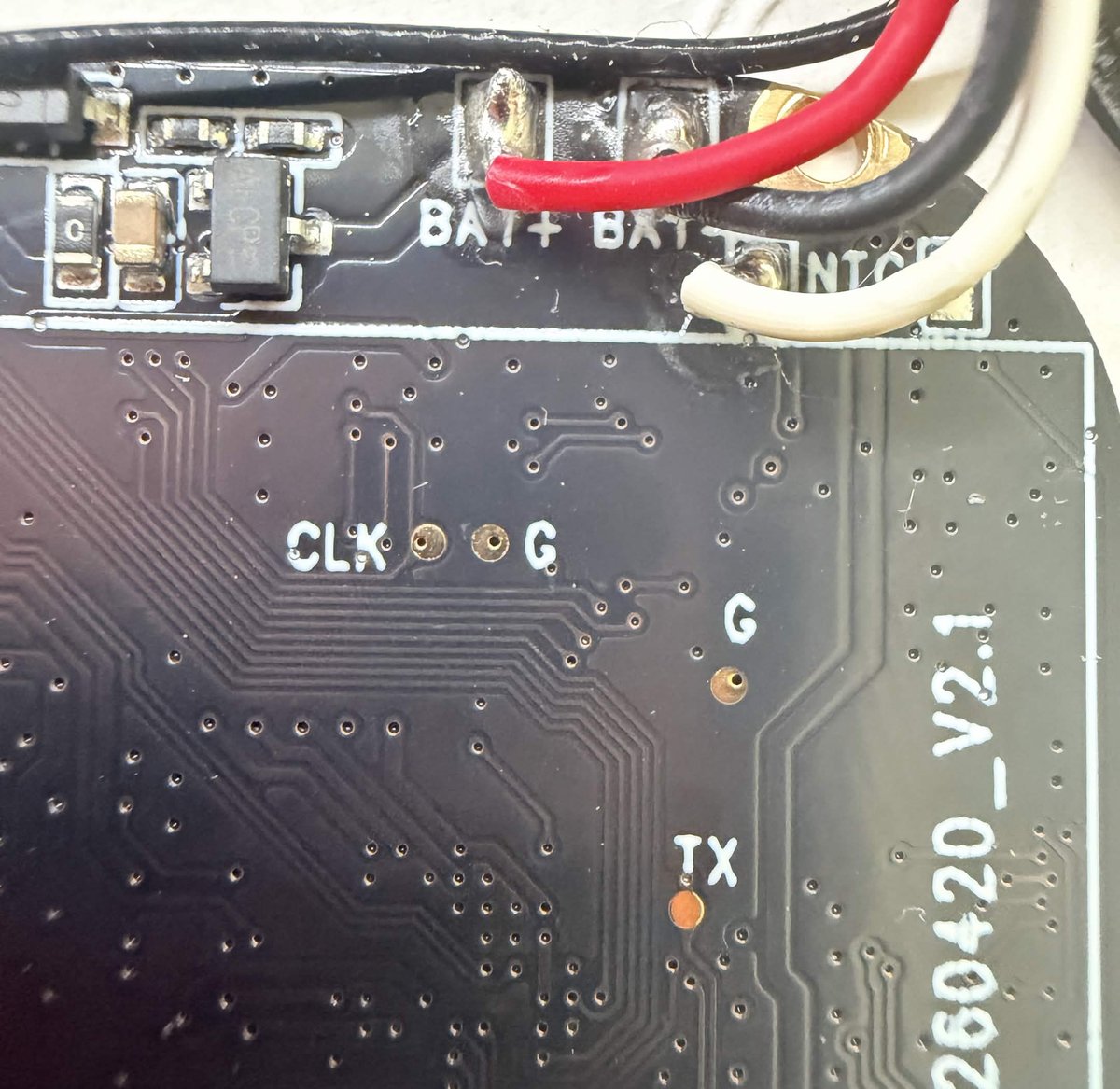
Test pads on side B, jacks-at-bottom view: CLK and G pair below the BAT+ pad, a single G, and the solid copper TX pad with a surface trace; battery wires BAT+/BAT-/NTC at the top. [AP30]
The pads are described in ../hardware/board_ap30.md § Test pads.
Open questions
- Does the software entry (marker
0x18AF) reach high-speed loader mode? - Battery-only behaviour in loader mode (unplugged: the code predicts a powered, stuck player until the long press).
- The full-speed burst: which boot stage produces it, and why it was missing once after a long press.
- rkdeveloptool
wlon this loader (not tested). - Which component produces the 8 s reset.
Sources
- [AP30] measured on a device (button and long-press tests with host logs and a countdown timer, slot rewrites, hidden- area dumps, the hang-and-recover test); analysis of firmware V1.7.8 (vendor SCSI commands, reboot path) and of the boot loader.
- [EVK] Rockchip RKNanoD reference board guide V2.2 and schematic (upgrade key, boot order); RKNanoD SDK (loader v4.04).
- [WEB] rkdeveloptool, https://github.com/rockchip-linux/rkdeveloptool; Rockusb wiki, https://opensource.rock-chips.com/wiki_Rockusb (archived copy; the site is often unreachable); Echo Mini recovery procedure for comparison, https://github.com/TheMVS/snowsky-echo-mini-recovery.
- Related: ../firmware/boot_loader.md, ../firmware/usb_modes.md, backup.md.